
A vehicle dot on a map is useful only if it reflects what is happening now. Live fleet visibility gives operations teams current vehicle locations, trip status and movement updates, helping them respond to delays and changes as they happen. Tracking systems can also use geofence alerts to show when a vehicle enters or leaves a defined location.
Knowing where vehicles are matters, but the value lies in using that information well. This article explains what real-time vehicle tracking shows, how location updates and geofence alerts support dispatch and arrival planning, and what to consider when putting fleet visibility into practice in Zimbabwe.
You’ll also learn how update frequency, connectivity, data accuracy and team processes shape the information managers see. The aim is to show how to move beyond map monitoring and make clearer operational decisions.
Key Takeaways
- Use dwell time and route deviations to spot delays, investigate stops and improve operational decisions.
- Match tracking updates to the decisions your team needs to make, from dispatch changes to arrival estimates.
- Set geofence alerts around important locations and arrival windows so teams can respond to exceptions sooner.
- Build implementation around compatible hardware, reliable connectivity, accurate data, team training and clear monitoring policies.
What does fleet visibility mean in practice?
Live fleet visibility shows vehicle locations, status and activity through GPS updates sent to a monitoring platform. Managers use this current view to assess movement, spot exceptions and adjust operational plans across Zimbabwe.
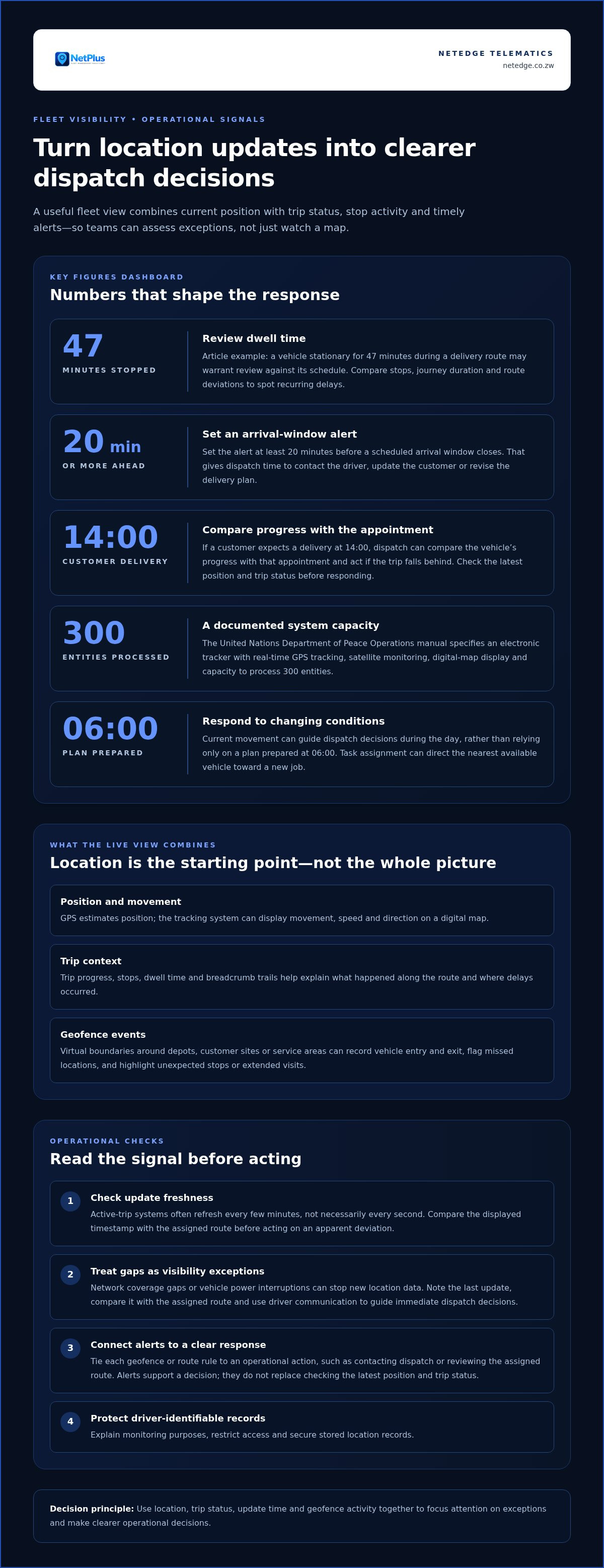
KPIs turn location data into a clearer picture of performance across routes and shifts. Dwell time measures how long a vehicle remains at a stop, while route deviation highlights movement away from its planned path. For example, a vehicle stationary for 47 minutes during a delivery route may warrant review against its schedule. Compare stops, journey duration and deviations to identify recurring delays, then adjust dispatch plans or shift assignments.
Breadcrumb trails connect successive GPS points to show the route a vehicle actually travelled. Reviewing the trail helps teams verify reported routes, locate unplanned stops and understand where delays occurred. Historical trip records can support analysis of journey duration, fuel consumption and stops. Dynamic route optimization uses current movement and conditions to guide dispatch decisions, while task assignment can direct the nearest available vehicle toward a new job. These actions help managers respond to changes rather than rely only on a plan prepared at 06:00.
Geofence activity and route monitoring
A geofence is a virtual boundary around a place, such as a depot or customer site, that records when a vehicle enters or exits. Teams can use these events to monitor arrivals, departures and time spent on site, then compare them with scheduled activity. Alerts for missed locations, unexpected stops or extended visits help dispatch focus on exceptions. A route deviation alert can also prompt managers to review progress and adjust the plan.
Tracking risks and operational limitations
Network coverage gaps and vehicle power interruptions can disrupt the updates needed for real-time tracking in Zimbabwe. GPS data reaches the platform through a communications connection, so a loss of connectivity may leave managers viewing an older position. If tracker power is interrupted, new location data may stop. Treat gaps as visibility exceptions: note the last update, compare it with the assigned route and use driver communication to guide immediate dispatch decisions.
Fleet tracking features and their operational uses
GPS identifies a vehicle’s position, while fleet tracking organizes location and activity data to support operational decisions. The key difference is how the system turns updates into dispatch actions.
GPS-based vehicle location tracking
GPS-based tracking uses satellite signals to estimate a vehicle’s position, then reports that location through a tracking system. Managers can monitor movement, speed and direction on a digital map, helping dispatch teams coordinate deliveries or assign a nearby technician. The United Nations Department of Peace Operations manual specifies an electronic tracker with real-time GPS tracking, satellite monitoring, digital-map display, and capacity to process 300 entities. This illustrates how tracking can serve larger operational views.
Fleet visibility and basic GPS tracking
Basic GPS tracking may report a vehicle’s position at set intervals, while fleet visibility combines location with status, activity and operational context. That difference matters when dispatch needs to respond between updates. A delivery vehicle’s location alone shows where it is; trip progress, stops and alerts help explain what needs attention. Geofencing can send automatic notifications when vehicles enter or leave defined sites, supporting delivery, service and depot operations.
Technologies enabling live tracking
A real-time tracking system can combine a GPS device, telematics unit, vehicle sensors, wireless connectivity and centralized software. The device gathers location and vehicle data, and connectivity sends updates to the platform for display and analysis. In Zimbabwe, handle driver-identifiable location records with privacy in mind: explain monitoring purposes, restrict access and secure stored records. A connected fleet tracking system can make these inputs useful for dispatch and daily oversight.
Location accuracy and update frequency
Accuracy and update frequency depend on the device, connectivity, settings and platform. Active-trip systems often refresh every few minutes, but live tracking doesn’t necessarily transmit every second. A weak connection can delay the position shown, while a newer update gives dispatch a more current view. Compare the displayed timestamp with the vehicle’s assigned route before acting on an apparent deviation. A fleet tracking solution can bring location updates into a practical view for operational decisions.
Geofence alerts and scheduled arrival windows
A geofence is a digital boundary around a depot, customer site or service area. When a tracked vehicle enters or exits the zone, the system can alert the operations team. It can also flag a missed location or a vehicle that stays longer than expected. These events give dispatch a clearer status view and help teams spot exceptions without repeatedly checking every vehicle’s movement.
Arrival windows make those alerts more useful. If a customer expects a delivery at 14:00, dispatch can compare the vehicle’s progress with the appointment and act if the trip falls behind. Set an alert at least 20 minutes before a scheduled arrival window closes, allowing time to contact the driver, update the customer or revise the delivery plan. The alert supports a decision; it doesn’t replace checking the vehicle’s latest position and trip status.
Business rules help distinguish routine movement from events that need action. For example, a rule can flag entry into an unplanned zone, departure before a site task is complete, or time on site beyond the expected visit. Automated alerts make these exceptions easier to identify and respond to. Tie each rule to a clear operational action, such as contacting dispatch or reviewing the assigned route, so alerts remain useful instead of becoming background noise.
Reports can bring together geofence events, arrival performance, stops and exceptions for later review. A supervisor might compare scheduled and actual site arrivals, then identify recurring delays by route or shift. Decide who needs live status and who needs historical reports, and limit each view to relevant operational duties. This supports faster decisions during active trips and helps managers improve plans using recorded movement rather than relying only on memory or individual updates.
Fleet visibility implementation practices
Start by defining the operational decisions your fleet management team needs to make. A delivery dispatcher may need current trip progress, while maintenance staff need vehicle condition and service records. Identify these uses before selecting dashboard capabilities. This keeps tracking data tied to clear actions instead of collecting information without an operational purpose.
Next, assess hardware compatibility, network connectivity and data accuracy across the vehicles in scope. A tracker that reports reliably in one operating area may encounter connectivity gaps elsewhere in Zimbabwe. Compare platform timestamps with known vehicle movements, and check that vehicle identifiers match fleet records. Resolve discrepancies before managers rely on reports for dispatch or maintenance decisions.
- Set the purpose: connect each dashboard view to a decision, such as assigning a job or reviewing a delayed trip.
- Test the equipment: confirm each tracker works with the vehicle and sends usable location data.
- Review coverage: note where updates become delayed, then define how dispatch handles missing information.
- Train the team: show drivers and managers how alerts, status updates and reports guide their roles.
- Set monitoring policies: explain what the fleet monitors, who can access records and how teams use them.
Introduce the system with a practical workflow. For example, a speeding alert should prompt a defined review, not an automatic assumption about the driver. A maintenance flag should reach the person who can assess the vehicle. Use completed trips to compare planned routes, stops and journey records, then adjust procedures when recurring exceptions point to a process issue.
Keep reviewing the setup as routes, vehicles and team responsibilities change. A dashboard that supports dispatch today may need different views when maintenance staff take on more monitoring. To put these practices into operation, plan your fleet visibility implementation around your vehicles, connectivity and team workflows.
Netedge Telematics: Netplus Fleet Intelligence
Netedge Telematics offers Netplus Fleet Intelligence for businesses seeking better oversight of vehicle operations. It is a practical next step when location updates and trip records need to inform everyday fleet decisions, from dispatch coordination to reviewing vehicle use.
Use this guide’s implementation priorities to define what your operation needs to monitor, how teams will use the information and what workflows should follow an alert. Netplus Fleet Intelligence sits alongside Viewplus CCTV & Security, Shabanq Fleets and CourierPlus Smart Delivery. Each offering addresses a distinct operational area, so the right fit depends on the task your business needs to manage.
Contact Netedge Telematics to discuss your fleet visibility requirements and next steps.
Turn fleet insight into your next operational decision
Decide where better vehicle oversight could make the greatest difference in your operation. Identify the decisions your team needs to make sooner, then align fleet information with those workflows. This gives managers a clear basis for deciding how visibility can support day-to-day operations in Zimbabwe.
Netedge Telematics offers Netplus Fleet Intelligence for fleet operations, alongside Viewplus CCTV & Security and Shabanq Fleets. These offerings address different business needs, so start with the operational challenge you want to manage. Discuss your priorities with Netedge Telematics to connect live fleet visibility with your team’s needs and implementation approach.
Set out your key operational requirements and discuss the next steps with Netedge Telematics. Contact Netedge Telematics to discuss your fleet and identify a practical direction for improving oversight.
Frequently Asked Questions
What Is a Real-Time Vehicle Tracking System?
A real-time vehicle tracking system collects vehicle location updates and presents them for operational use. A dispatcher can use the current view to decide whether a vehicle is suitable for another task, while a supervisor can review completed trips later. The system supports decisions by connecting vehicle movement with assigned work, rather than treating a map position as the whole operational picture.
What is the difference between fleet tracking and fleet visibility?
Fleet tracking records vehicle movement, while fleet visibility helps teams interpret that information in context. A route record, for example, may show where a vehicle travelled, but visibility connects that trip to its assigned delivery, shift or service task. That context helps managers distinguish a necessary stop from a process issue and decide whether to follow up.
How does fleet visibility improve operational performance?
Fleet visibility can improve performance by helping managers identify where a process needs attention. If completed trips repeatedly show delays before the first customer visit, a manager can review departure preparation or job sequencing. The useful measure is whether a change improves the workflow, not simply whether the dashboard contains more data. Compare operational records over time and assign responsibility for follow-up.
How is fleet visibility technology evolving?
Fleet visibility is evolving from showing current position to estimating how a journey may progress. Predictive location combines live movement with historical trip patterns to inform arrival expectations as conditions change. For example, dispatch can use an updated estimate to plan a handover or communicate a revised schedule. These estimates support coordination, while teams still use current trip information to make operational decisions.
What Does Live Fleet Tracking Show in Real Time?
Live fleet tracking can show a vehicle’s location, speed, direction and trip progress. Depending on the system, managers can also review stops, vehicle activity and alerts tied to defined events. A map position shows where the vehicle is; an arrival estimate is a projection based on movement and journey patterns. Keeping that distinction clear helps teams communicate status accurately.
What components make up fleet visibility systems?
Fleet visibility systems typically combine an in-vehicle GPS device, telematics equipment, vehicle sensors, wireless connectivity and centralized software. The device gathers information, connectivity transmits it, and the software organizes it for operational users. Dispatch may need a live vehicle view, for example, while a manager may use trip records to review completed work. Clear access roles help each team use relevant information.
