
A map dot alone cannot make a fleet safer. GPS fleet tracking combines vehicle location and movement data with software that helps managers review speed, routes and driving activity. Used well, fleet tracking for safer driving gives teams a clearer basis for coaching drivers, planning routes and responding to hazards.
Knowing where vehicles are is a useful starting point, but managers also need information they can act on. Tracking data can reveal risky driving patterns, delays and inefficient routes, helping teams respond more effectively when conditions change.
This article explains what GPS fleet tracking is and how it works, then explores its role in driver safety, route planning, hazard response and fleet data access. It also shows how tracking information can support day-to-day decisions without treating technology as a substitute for safe driving practices.
Key Takeaways
- Use patterns in driving data to guide focused coaching and recognise safer habits.
- Review vehicle activity to spot avoidable fuel use and investigate possible misuse.
- Use trip information to adjust plans when traffic, road conditions or incidents disrupt a journey.
- Make fleet data easier to use by organising it in software that supports operational decisions.
How do fleet management solutions enhance driver safety?
Tracking data turns driving events into coaching opportunities. Managers can review patterns, discuss risks and support safer decisions.
When comparing tracking providers in Zimbabwe, look for location updates, trip histories, speed alerts and driver reports. Check that managers can link each event to its vehicle, route and driver.
Monitor posted speed limits, driver authorisation, vehicle condition, seat-belt use and rest practices. Use applicable Zimbabwe traffic rules and workplace procedures as coaching criteria.
For privacy, explain why driver-linked location and behaviour data is collected, restrict access, and set retention practices. Zimbabwe operations should handle collection, storage, and sharing in line with applicable data-protection requirements.
Driver Behaviour Monitoring
Monitoring can flag speeding, harsh braking and rapid acceleration, then link each event to a trip. Before coaching, managers should review recurring patterns alongside route conditions. For example, repeated harsh braking on a familiar delivery run can prompt discussion about following distance, approaching junctions and workload. Individual records help tailor training and recognise consistently safe driving.
Speed, Routes, and Driving Habits
Compare speed with assigned limits, journey plans and trip history. A single alert does not explain an event. GPS records can reveal recurring speeding, detours, idling or abrupt manoeuvres. Use patterns to choose a coaching topic, adjust a route or investigate operational pressure. This approach can support driver safety across delivery, service and transport operations.
Work-hour and break records help managers review time on the road and rest practices. Use them to identify demanding schedules and discuss safer shift planning with drivers.
Introduce tracking by explaining its purpose, showing drivers how monitoring works and agreeing how managers will review events. Start with clear coaching procedures and consistent feedback.
Tracking has limits: location gaps, missing context or a misread alert can distort an event. Managers should review trip details and hear the driver’s account before deciding on corrective action.
Assess results by comparing safety events, speeding patterns and repeat incidents over time. Review the same measures consistently alongside coaching actions to see whether risks and crashes decline.
What is Vehicle Tracking?
GPS devices transmit vehicle location and activity to fleet software, giving managers a shared view of movement. In Zimbabwe, that visibility can help teams review routes, fuel use, maintenance needs, and possible misuse.
GPS Vehicle Location Tracking
A vehicle-mounted GPS device records location and sends it to tracking software, where managers can view trip histories and current positions. For a fleet travelling between a depot, customer sites and regional roads, compare planned journeys with recorded routes. Check that location records clearly identify each vehicle and provide enough trip detail for operational review.
Live Vehicle Activity
Live tracking shows where vehicles are and can display activity such as speed and idling. Managers can use alerts for speeding, extended idling or entry into a restricted area to decide when closer review is needed. A location point shows position, not the reason for a stop, so compare it with route plans and dispatch information.
Fuel Efficiency and Misuse Prevention
Compare route distance, idle time, and driver behaviour to identify avoidable fuel use. Fuel tracking can measure diesel consumption in litres per 100 km, helping managers compare similar vehicles and journeys. A longer route or repeated idling can prompt a review of dispatch choices, traffic conditions, or vehicle use.
Vehicle tracking can also support theft response. Location data may help teams locate a stolen vehicle, while unauthorised-use alerts can flag unexpected movement. Fuel theft can drain a tenth of a fleet’s fuel budget, so investigate unusual consumption patterns. Mileage records and maintenance schedules also help managers plan servicing before issues disrupt work.
For camera-based protection alongside fleet visibility, Viewplus CCTV and security solutions can support a broader vehicle security approach.
Planning safer routes and responding to hazards
Trip records help managers compare planned journeys with actual conditions. Use them to adjust routes, reduce avoidable idling and respond when traffic or hazards disrupt a trip.
Route History and Optimisation
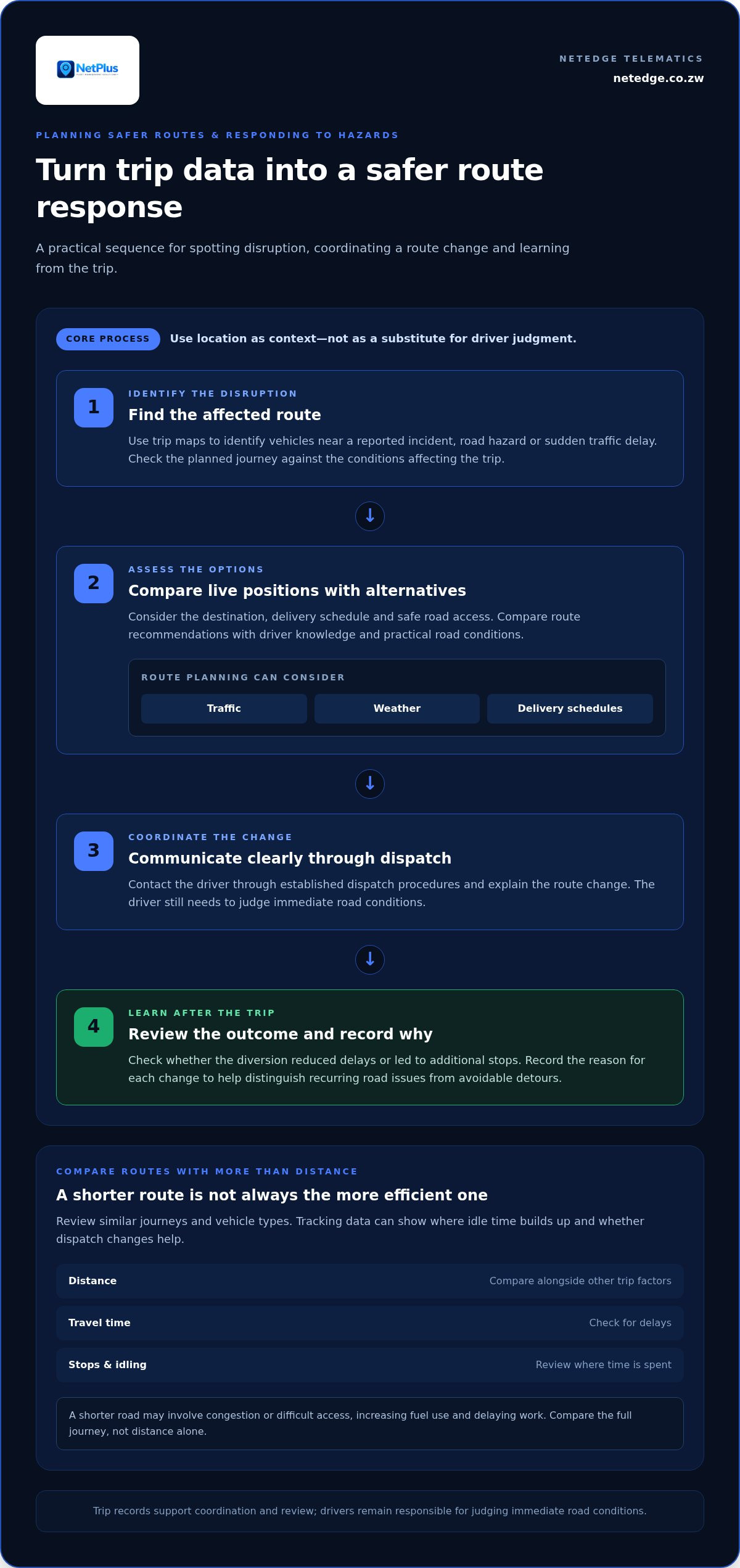
Review trip maps for repeated detours, delays and stops that differ from the planned route. For example, if several drivers encounter congestion near the same delivery site, revise the visit sequence or timing. Route optimisation tools can consider traffic, weather and delivery schedules. Compare their recommendations with driver knowledge and practical road conditions.
Route Efficiency and Fuel Use
Compare routes by distance, travel time, stops and idling, not distance alone. A shorter road may involve congestion or difficult access, increasing fuel use and delaying work. Tracking data can show where idle time builds up and whether dispatch changes help. Review similar journeys and vehicle types to assess whether revised practices improve efficiency and productivity.
For hazard response, use current trip maps to identify vehicles near a reported incident, road hazard or sudden traffic delay. Contact the driver through established dispatch procedures, then assess whether rerouting is suitable. Any route change should account for the destination, delivery schedule and safe road access. Location information supports coordination, but drivers still need to judge immediate road conditions.
A practical review can follow three steps: identify the affected route, compare live vehicle positions with alternatives, and communicate a clear change to the driver. After the trip, review its history to see whether the diversion reduced delays or led to additional stops. Recording the reason for each change helps managers distinguish recurring road issues from avoidable route choices.
Use driver behaviour and incident records alongside route data. Repeated harsh braking or sudden stops on one stretch may indicate a location that needs closer review. Over time, this combined view helps teams refine route plans, reduce idle time and make safer decisions when traffic conditions change.
Fleet tracking software and cloud data
Telematics gathers vehicle information, then tracking systems organise it into records fleet managers can use. These records may include routes, speed, idle time, mileage, engine diagnostics, and driver behavior. Cloud-based access can bring those details together for teams reviewing activity across vehicles and shifts. The practical value lies in turning separate events into a clearer operational picture.
Build a review routine around specific decisions. For example, managers can examine a speeding event alongside its route, time and vehicle history before choosing a coaching response. Mileage and engine data can inform maintenance scheduling, while inspection records help track vehicle condition. This context supports better decisions without treating a single alert as a complete explanation.
Shared fleet data can also support day-to-day coordination. Tracking information may help with dispatch planning, fuel management and responses to delays or emergencies. A dispatcher can compare a vehicle’s progress with its delivery schedule, then update plans when traffic affects arrival times. Digital inspection or proof-of-delivery records can also reduce reliance on scattered paperwork.
To make data useful, define who reviews each record, what action follows, and how outcomes are documented. A manager might review repeated idling weekly, assign an operational follow-up, and compare later trips. Clear access controls and consistent recordkeeping help teams handle driver and vehicle information responsibly. The goal is not to collect everything, but to support safer decisions and steady productivity.
Tracking systems can inform responses, but they cannot prevent every incident or replace sound management. Their value depends on accurate records, timely review and practical follow-through. A maintenance alert, for example, matters only when it leads to a scheduled inspection and a recorded outcome.
For a structured way to bring fleet information into operational decisions, explore fleet intelligence options.
Netedge Telematics: Netplus Fleet Intelligence
Netedge Telematics offers Netplus Fleet Intelligence to help businesses take a structured approach to fleet oversight. It is a relevant option when your team wants to bring GPS fleet management into operational planning and use vehicle information to support safer driving and route decisions.
Start by identifying the decisions your fleet needs to support, such as reviewing journeys, coordinating vehicles or improving operational visibility. This helps you determine how fleet intelligence can fit your processes. Netedge Telematics also offers Viewplus CCTV & Security, Shabanq Fleets and CourierPlus Smart Delivery for related needs.
To discuss Netplus Fleet Intelligence for your operation, visit netedge.co.zw.
Turn Fleet Visibility into an Operating Practice
Decide how your team will use fleet data consistently. Assign responsibility for reviewing information, define which events require follow-up and agree how coaching actions will be recorded. A simple operating routine helps tracking support decisions instead of becoming another stream of alerts.
For Zimbabwe businesses assessing fleet tracking for safer driving, the right setup should align with the way vehicles are dispatched, monitored, and managed. Netplus Fleet Intelligence is one offering to consider for fleet oversight. Netedge Telematics also offers Viewplus CCTV & Security and Shabanq Fleets, which address related security and fleet management needs.
Choose a practical starting point, such as reviewing how your team currently handles driver feedback or journey information. Then decide which process needs clearer oversight first. Contact Netedge Telematics to discuss your fleet requirements and take a considered next step toward more structured operations.
Frequently Asked Questions
What is GPS Fleet Tracking?
GPS fleet tracking uses vehicle devices and software to record where fleet vehicles travel and how they are used. Managers can review trip records to answer practical questions, such as whether a vehicle reached a scheduled stop or took an unexpected detour. The information supports operational oversight, but does not explain every driving decision without context from dispatch records or the driver.
What is Fleet Safety and Why Does It Matter for Your Bottom Line?
Fleet safety comprises the practices and decisions that reduce risks to drivers, vehicles and other road users. It matters financially because collisions can involve vehicle damage, medical expenses, legal fees, lost productivity and higher insurance premiums. A practical starting point is to review incident reports alongside vehicle downtime and repair records, then address recurring causes through training or operational changes.
What is Real-Time GPS Tracking?
Real-time GPS tracking displays a vehicle’s current location and activity as information is transmitted to fleet software. A dispatcher can use it to identify the vehicle nearest to a new job or whether a vehicle has stopped unexpectedly. A live view is useful only when location updates are timely and connectivity is reliable, so interpret gaps alongside trip history and driver communication.
How does fleet tracking improve driver safety?
Fleet tracking supports safer decisions by giving managers evidence to guide coaching and follow-up. Recurring speeding alerts on a particular route, for example, can prompt a review of the schedule, road conditions and driver practices. The aim of fleet tracking for safer driving is to turn relevant observations into consistent action, such as targeted instruction, clearer dispatch plans or recognition of safe habits.
What fleet tracking features help prevent accidents?
Speed alerts, harsh-braking records, trip histories and maintenance reminders can help managers identify risks before they recur. A vehicle that repeatedly triggers braking events may need a driver discussion, route review or mechanical inspection. These features help teams act on warning signs, but they do not prevent every collision. Managers should consider the circumstances behind each alert.
How do telematics systems detect speeding, harsh braking, and distracted driving?
Telematics can compare recorded vehicle speed with a configured threshold and identify sudden changes in movement, such as harsh braking or rapid acceleration. These events flag behaviour for review, not necessarily its cause. Identifying signs of distracted driving generally requires additional evidence, such as road-facing or driver-facing dashcam footage. Managers can then review the context and use it for appropriate coaching.

